Guindo Design
Strategic Digital Product Design
Jeikin
Accessibility built into the AI agent workflow
The problem nobody wants to solve
We have spent many years designing tools and applying artificial intelligence at different levels, collaborating with companies of all sizes, and there is something that repeats itself in every project: technical accessibility creates too much friction in development.
Teams want to meet all the requirements, but accessibility feels like a stone in their shoe — something that adds complexity, slows down deliveries, and nobody knows where to start fixing. Existing tools detect problems but don't help fix them. They flag errors and disappear. The developer is left alone with a list of warnings they don't understand.
Meanwhile, AI agents are writing more and more code. Entire components, complete pages, functional flows. Fast, efficient, impressive. But with no accessibility controls. AI is designed to be compliant and consume few tokens, which means it tends to prioritise quick results and generate inaccessible code by default. No manual audit can keep up with that pace.
The European Accessibility Act is already here. Teams need to comply, but the process for doing so is still broken.
The origin of Jeikin
At Guindo, we have been working with artificial intelligence for years. When AI agents started writing complete code — not just suggesting lines, but generating entire components, pages, and flows — we saw they were producing interfaces with no accessibility criteria whatsoever. Buttons without labels, forms without associations, insufficient contrast, non-existent keyboard navigation.
If AI agents are so efficient at producing code, why can't they ensure it's accessible? Not as a simple linter that shows warnings in the terminal, but as a review companion that knows which criteria apply, that demands fixes be verified, and that generates compliance documentation automatically. That companion is Jeikin (opens in a new window).
The design challenge
Jeikin had to work for three audiences that never see each other.
- The developer lives in their editor, on GitHub, in the terminal. They don't want to learn a new tool. They don't want to open another dashboard. They want accessibility to appear in their usual workflow, in their language, without interrupting what they're already doing.
- The team lead needs exactly the opposite: an overview. How many issues are open, what the trend is, what evidence they have for an audit. They need a dashboard, but one that feeds itself, without depending on the team remembering to update anything.
- And there is a third user nobody had designed for before: the AI agent. For an agent to do a quality accessibility review, it needs clear instructions, well-defined criteria, and a structured flow that prevents it from skipping steps. Designing the agent's experience is designing the quality of the result.
The decisions that shape the product
Invisible to the developer, visible to the lead
Jeikin is not just another tool in the stack. It integrates directly into the editor and GitHub. The developer requests an accessibility review as part of their conversation with the AI agent, receives findings with references to the exact file and line, fixes them, and the agent itself verifies the fix is valid. No context switching, no opening another tab.
The team lead, meanwhile, sees all progress on the dashboard: open issues, covered criteria, project trends, exportable evidence. Information flows from the editor to the dashboard without anyone having to do anything.
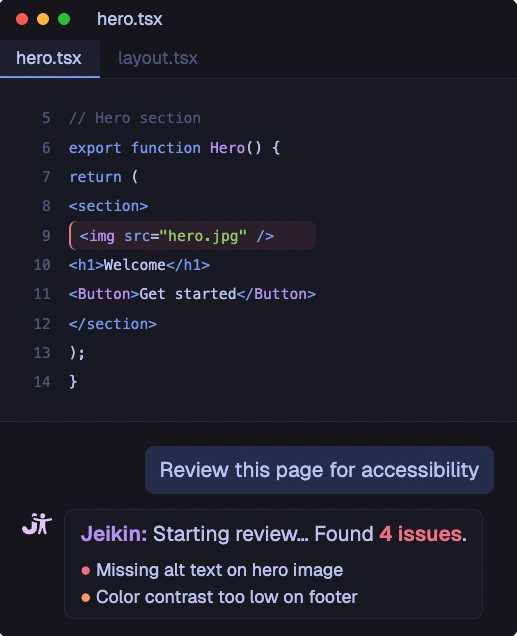
The developer reviews accessibility from their editor, without switching context
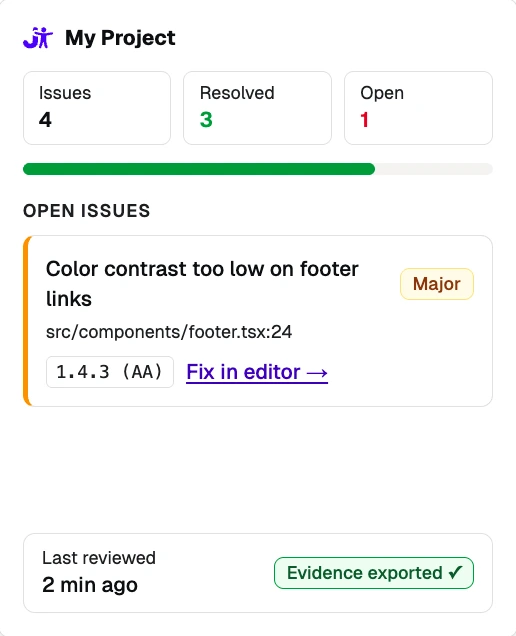
The team lead sees progress on the dashboard: issues, criteria, and evidence
Dogfooding as a design principle
Jeikin audits itself. Every screen, every component, every piece of text in the product has been through its own review tool. This forces us to solve every problem we detect before asking anyone else to do the same. If Jeikin can't meet its own criteria, it has no authority to demand them from others.
Transparency and trust
Jeikin explains what it's going to do before doing it. It asks permission before scanning code. It doesn't modify anything without approval. The code stays on the developer's machine; only findings reach the dashboard.
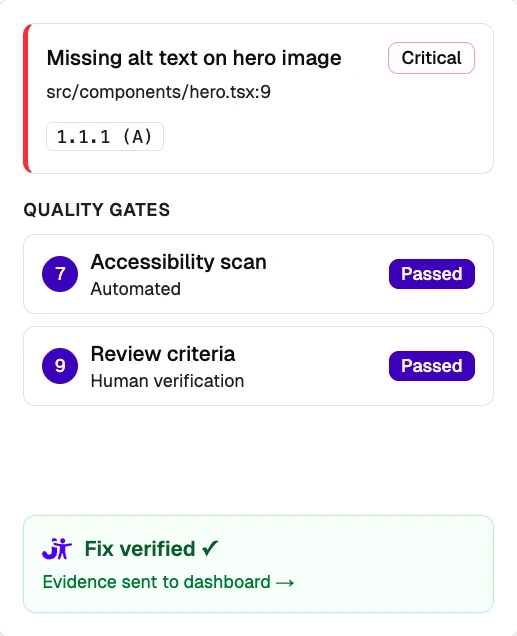
Every fix is automatically verified before being marked as resolved
The GitHub App
The GitHub application (opens in a new window) automatically reviews every pull request. It publishes actionable findings directly in the code, with the applicable accessibility criterion and links that open the exact file in the editor with a single click. Critical issues block the code from being merged until they are fixed. The developer doesn't need to remember that Jeikin exists. Jeikin appears when it's relevant and steps back when it's not.
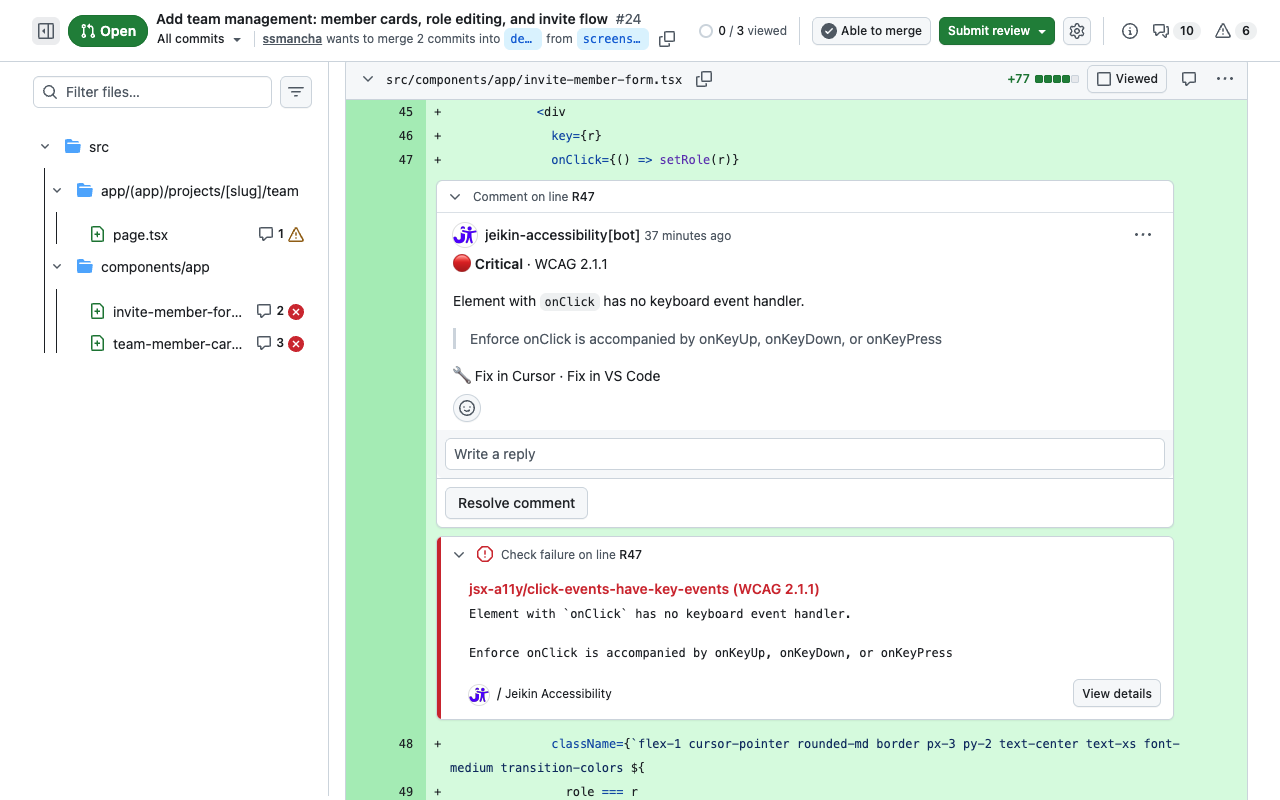
Jeikin publishes actionable findings directly in the pull request code
This is just the beginning. Jeikin is not a static product, but a living project that evolves every week. We are gathering constant feedback from the teams already using it to refine workflows and ensure the tool adapts to the reality of every sprint. We are not looking for theoretical perfection, but a pragmatic solution that evolves at the same pace as our users' needs.